
Polar Cloud
Calculated Fields
Calculated Fields or Virtual Entities let you create a new tag from other tags that already exist in the same Site.
Think of them as a live formula. Instead of wiring in a new physical sensor, you tell the platform to calculate a value from existing site data, such as:
Industry | Example |
|---|---|
Solar EPCs and Installers | Calculate performance ratios, temperature-adjusted values, or combined totals across related tags |
Water Processing | Calculate a compliance or quality score from multiple measurements |
Acriculture | Calculate growing-condition indicators, tank totals, or irrigation-related values from existing sensors |
What they do
- A Calculated Field creates a new site-level tag that: uses one or more existing tags as inputs
- applies a formula shows the result like a normal value in the platform
- can be used anywhere the platform allows a virtual/calculated tag to be selected
How they work
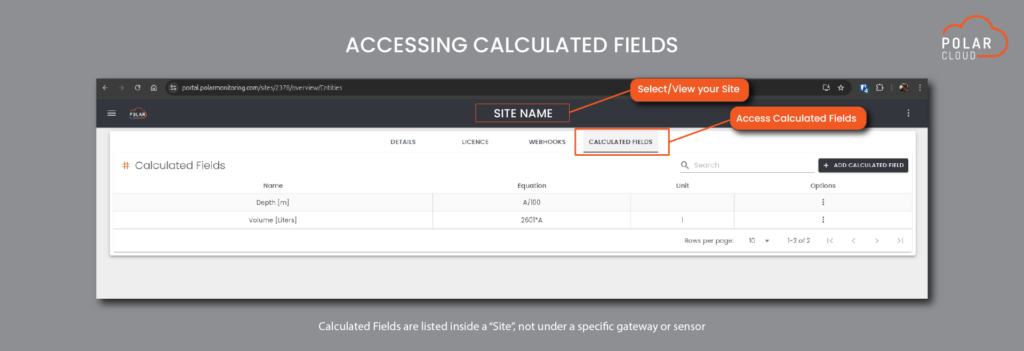
- Open the Site where you want the Calculated Field to live.
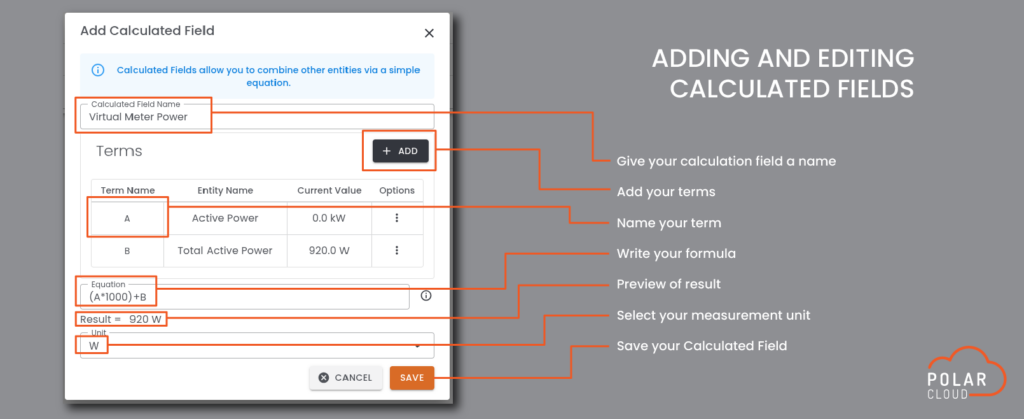
- Add a new Calculated Field.
- Add the source tags you want to use as inputs.
- Give each source tag a short variable such as A, B, or C.
- Write a formula using those variables.
- Optionally choose the unit you want displayed for the result.
- Save it.
When the platform needs the value, it reads the latest available values from the source tags and calculates the answer at that moment.
For historical charts, it does the same thing using the historical data from the source tags, rather than reading from a stored copy of the Calculated Field.
Here is a simple example
If you have:
- A = Flow In
- B = Flow Out
You could create:
`A – B` to show net flow.
Another example:
- A = Tank 1 level
- B = Tank 2 level
You could create:
`A + B` to show total storage.
Formula rules
Calculated Fields are designed for straightforward maths. They support normal arithmetic such as:
- addition `+`
- subtraction `-`
- multiplication `\*`
- division `/`
- brackets `( )`
- powers `^`
Each source tag is linked to a one-letter variable, such as A, B, or C.
The formula can only use the variables you added to the Calculated Field.
In the current create/edit screen, those inputs are selected from normal site tags (data tags).
Important information on Calculated Fields
1. Calculated Fields belong to a Site
Calculated Fields are site-scoped.
That means they are:
- Grouped within a Site exclusively
- Not tied to one gateway
- Not tied to one sensor
- They can use tags from that Site
This makes them useful for site-level operational views, totals, balances, and derived KPIs.
When the platform needs the value, it reads the latest available values from the source tags and calculates the answer at that moment.
For historical charts, it does the same thing using the historical data from the source tags, rather than reading from a stored copy of the Calculated Field.
2. They count toward site licensing
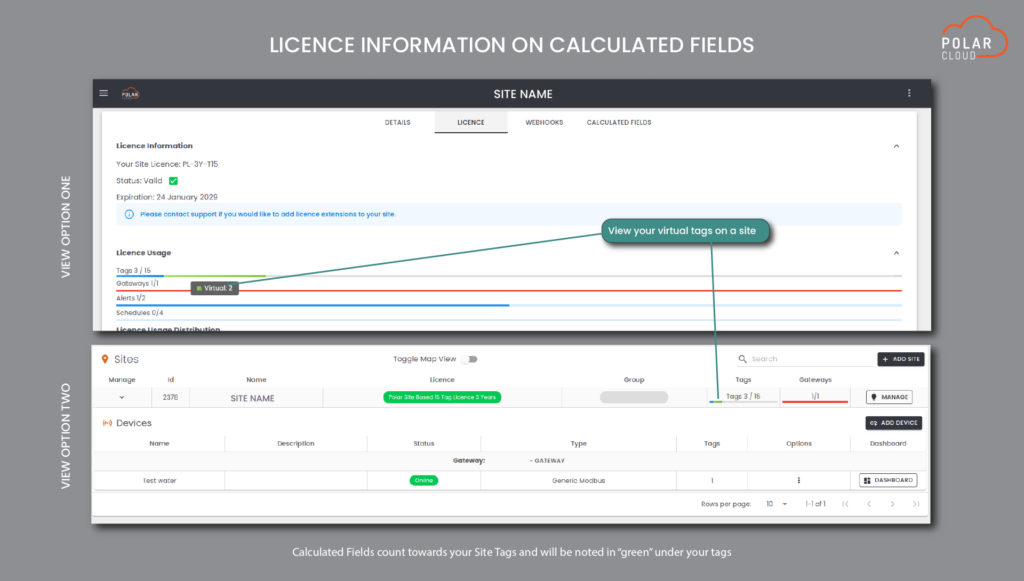
Calculated Fields are included in the site’s tag usage for licensing.
In simple terms: a Calculated Field is not a free extra line item. It is treated as part of the site’s tag count, alongside other tag types.
3. They are calculated on demand, not stored
This is one of the most important things to understand:
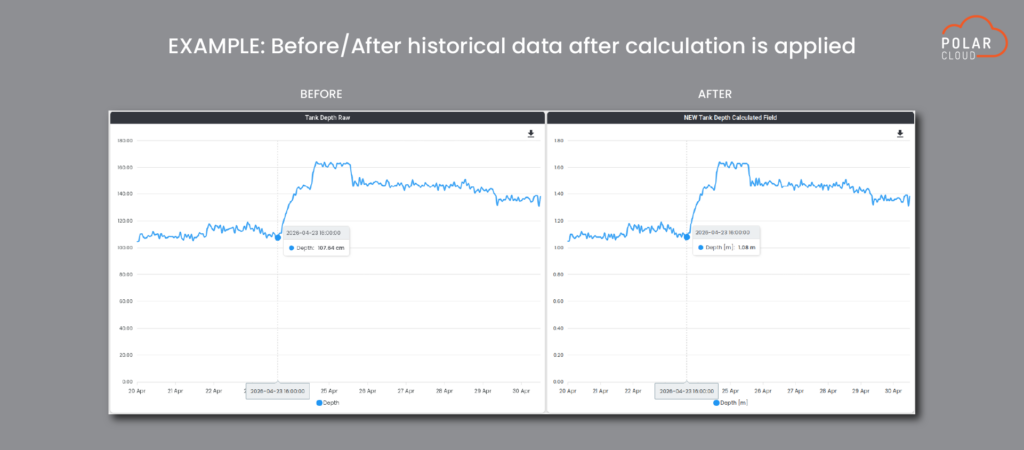
The platform does not store Calculated Field values as a separate historical record- Instead, it recalculates the value from the source tags whenever it is needed
Because of that:
- If you change the formula later, the historical results will also change
- Old charts and past values will reflect the new formula, not the old one
This is powerful, but it also means Calculated Fields should not be treated as a locked audit trail.
Limitations and practical cautions
1. Inputs must exist and be valid
If a source tag has no usable value at a point in time, the Calculated Field may also have no usable value at that point.
In practice, if one of the ingredients is missing, the answer may be blank or unavailable.
2. History depends on the source tags
Historical Calculated Field values are built from the source tags’ history.
That means:
- The source tags need to have historical polling/history available
- If the source tags do not support historical polling, the Calculated Field cannot produce normal historical results from them
- The history interval may follow the available timing of the source tags, so it may look less granular than expected when source tags poll at different rates
3. Raw history is not supported
Calculated Fields support calculated historical values, but not raw historical readings in the same way as a physical tag.
4. The unit is a display label
The unit you set helps users understand the result, but it does not automatically convert the values for you.
For example, if you want a Fahrenheit result from Celsius inputs, the formula itself must do that conversion.
5. Keep formulas simple
Calculated Fields are intended for practical operational formulas, not long or heavily complex expressions.
Some built-in limits apply, including:
- equation text length limits
- one-letter variable names
- protection against unsupported or circular formula structures
If a formula becomes too complicated, it is usually better to simplify it or break the requirement into a clearer operational measure.
6. Divide-by-zero and invalid formulas
If the formula is mathematically invalid, such as dividing by zero, the result cannot be calculated correctly.
Use Cases
1. When to use Calculated Fields
Calculated Fields work best when you want to:
- combine two or more site tags into one operational number
- create a more business-friendly KPI from raw telemetry
- reduce manual spreadsheet work
- show a clearer value on dashboards and reports
2. When not to use Calculated Fields
Calculated Fields are usually not the right tool when you need:
- a permanently stored historical value that must never change later
- a formal audit trail of the exact formula used at the time
- very advanced modelling logic far beyond a simple operational formula